




WordPress Radio Schedule Plugin (How to Choose)
A radio schedule is more than a timetable. It helps listeners understand what’s on now, what’s next, and it turns your shows into shareable pages that can bring new traffic to your station over time.
A radio schedule is not a normal calendar. It is part of the listening experience.
When someone lands on your website, the schedule answers two very practical questions:
- What’s on right now?
- When should I come back?
And there is a second benefit that many stations underestimate: a good schedule can turn your shows into shareable content. If each slot leads to a real show page, DJs, speakers, and guests have a clean link they can share on socials. That can become a self-powered source of traffic over time.
The problem is that many WordPress schedule plugins were built for gyms, restaurants, or generic events. They often end up as a static table. It works technically, but it doesn’t feel “on air”.
A radio schedule should feel alive: current show highlighted, upcoming shows visible, and show pages connected to the programming.
What a good radio schedule plugin should do

1) Handle radio logic (weekly and recurring)
Radio programming is repetitive by nature. Even when you change shows, the structure stays weekly.
A schedule plugin for radio must support:
- Recurring weekly slots that repeat consistently
- Multiple shows per day with exact start and end times
- A workflow to adjust the lineup without breaking the layout
If the plugin treats everything like a one-time “event”, you will spend too much time maintaining the schedule instead of running the station.
2) Make “On Air” obvious
A modern station website should not force the visitor to interpret a table.
The schedule should help with:
- Highlighting the current show automatically
- Showing what’s next without extra clicks
- Pre-selecting the current day in weekly views
This is not only a nice effect. It reduces friction and increases listening time because the website feels current, not static.
3) Link every slot to a show page
A schedule without show pages is a dead end.
If a listener sees a show name and can’t click it, you lose a chance to build connection. A good system lets each slot point to a show page that can include:
- Host identity and show description
- Social links and highlights
- Podcast episodes or replays (if you publish them)
This also makes your schedule more valuable for SEO long-term, because show pages become content assets that can rank and be shared.
4) Be genuinely usable on mobile
Most listeners discover stations on their phone. A schedule that looks fine on desktop but breaks on mobile is a silent growth killer.
Avoid schedules that:
- require horizontal scrolling
- show tiny text in a dense grid
- hide the current show inside long tables
Aim for layouts that remain readable, tap-friendly, and clear even on small screens.
5) Fit into the radio ecosystem
A radio website is multimedia. The schedule should not live in isolation.
Ideally, your schedule integrates with:
- the player experience
- show archives
- podcast pages (if you publish replays)
If the plugin cannot connect these pieces, you end up stacking multiple plugins and fighting compatibility issues.
Why Pro Radio schedule works differently
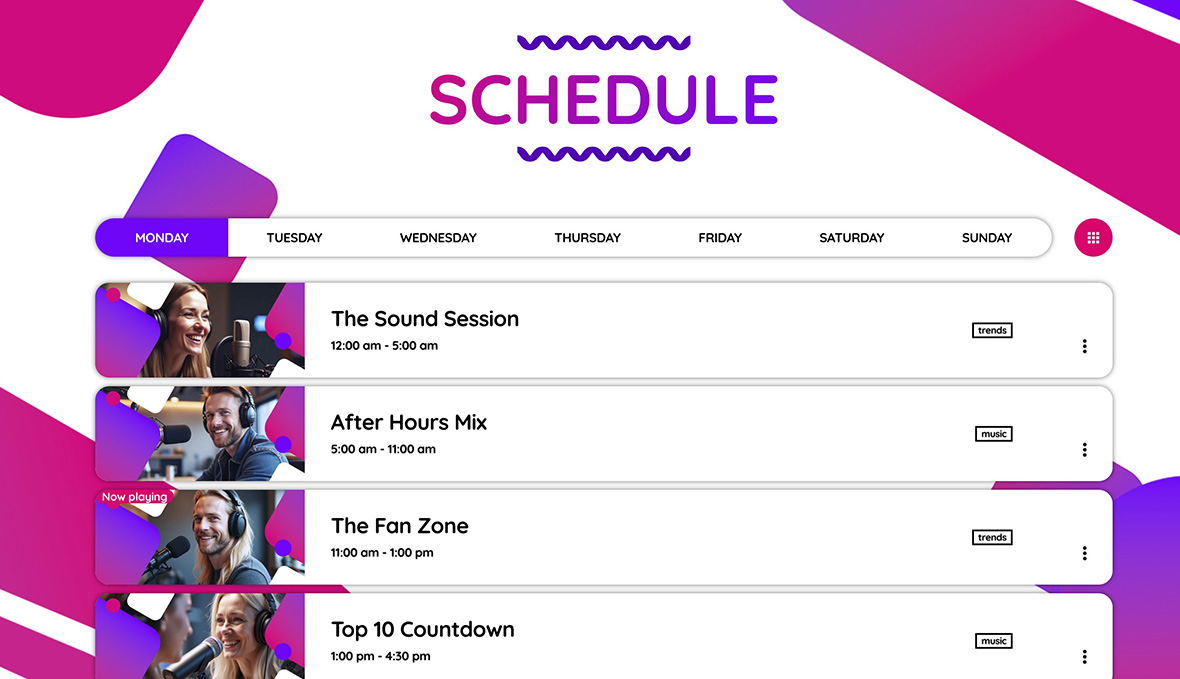
Pro Radio uses dedicated post types for Shows and Schedule. This approach solves the biggest structural problems:
- Schedule slots link to real show pages
- The same show can appear multiple times across the week
- You can display the schedule in modern layouts with Elementor templates
- Widgets can show what’s On Air in real time
Instead of being “just a table”, the schedule becomes part of the station identity.
How schedule management works in Pro Radio (simple explanation)
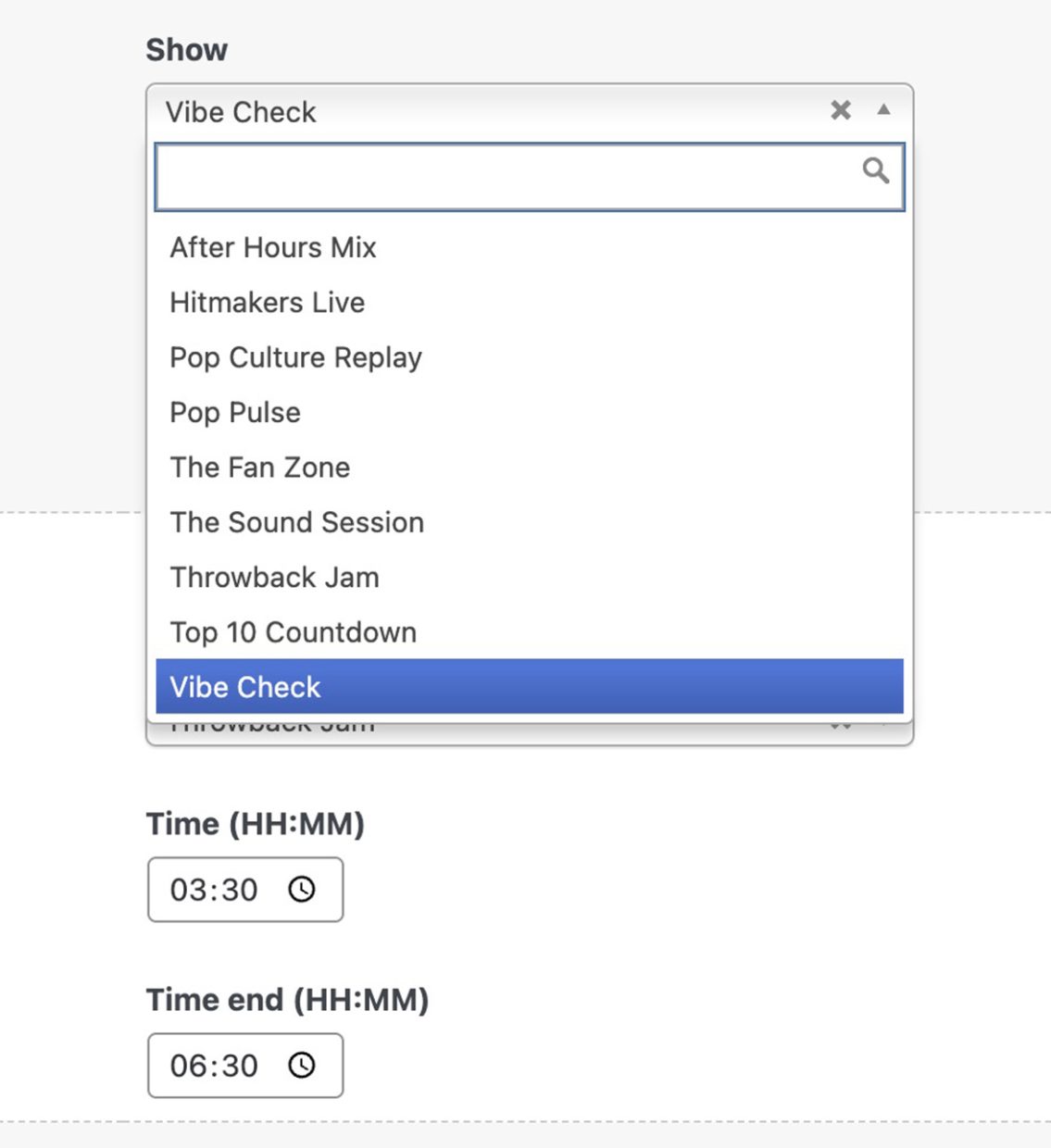
In Pro Radio the schedule is intentionally structured to match real radio operations:
- A Schedule post represents a day
- Inside it, you have a repeatable field
- Each row is a show slot: select the show from a dropdown and set start/end time
This makes it easy to build a clean weekly programming without needing a complex calendar workflow.
What to publish first (best practice)
If you want a schedule that looks complete and professional fast, do this:
- Create 3–8 show pages first
- Fill the week with those shows
- Create a Music Rotation show to cover gaps, so the station feels 24/7
- Publish a schedule page that highlights the current day and current show
Consistency matters more than having many shows. A clean weekly plan builds trust.
Documentation references
Related guides
- How to Start a Radio Station (Online + FM) Step-by-Step
- Import Podcast RSS Into WordPress (Clean Import)
- Add a Radio Schedule to Your Website (Best Practice)
- Podcast Archive Page (Layout + Filters)
- Radio Show Pages (Structure + Content That Works)
FAQ
Can I start with a simple schedule and improve later?
Yes. Start with a stable weekly plan and a few shows, then expand when your station grows. A consistent schedule is more valuable than a complex one.
Is a schedule worth it if my station is small?
Yes. It increases trust, gives people a reason to return, and creates shareable pages for hosts and guests.
Why not use a normal calendar plugin?
Most calendar plugins are not designed for recurring radio programming. They also do not connect schedule slots to show pages and multimedia content in a radio-friendly way.
Copyright 2019-2026 ProRadio® Qantum Themes SL® ESB02979078 All Rights Reserved