




Podcast Archive Page (Layout + Filters)
Learn how to turn your radio episodes into a structured podcast archive that increases engagement, attracts search traffic, and keeps listeners coming back to your website.
If you run a radio station, you might think podcasts are not something you need to worry about, that they belong to a different model of entertainment. But I’ll show you that this is not only untrue — podcasts are actually crucial for steady audience growth and for building a loyal fanbase of returning listeners.
A podcast archive is not just a list of past episodes. It is the memory of your radio station.
It is where a casual listener becomes a regular visitor. It is where a live broadcast turns into long-term content. It is where your work continues generating value even when the microphones are off.
When you build a proper podcast archive page, you are creating an evergreen media library. One that keeps bringing people back. One that ranks on search engines. One that makes your station feel professional, structured, and serious about its content.
Think about this:
Someone discovers your station through a guest interview. They search for that episode. They land on your archive. They see 40 more episodes on the same topic. They subscribe. They return. They share.
That is engagement.
That is long-term growth.
A strong podcast archive page should be:
- Easy to browse
- Fast on mobile
- Structured by series and categories
- Connected to your radio shows (so users can jump between live schedule and replays)
What a podcast archive should include
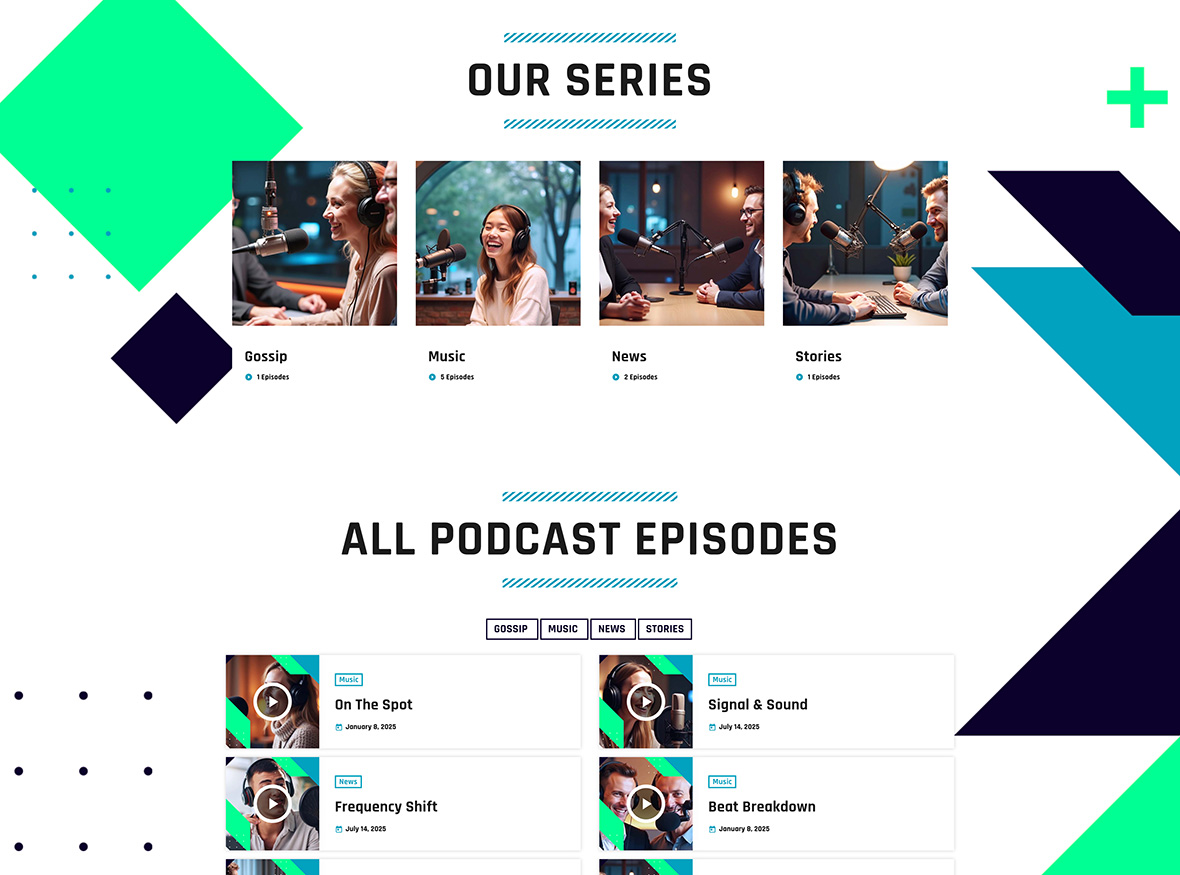
1) Clear structure (series vs episodes)
A clear structure helps listeners understand your content instantly. Most stations publish different types of content: interviews, weekly talk shows, music specials, guest mixes. Without structure, everything becomes confusing.
A smart setup usually includes:
- A series overview (one series per show or content format)
- A dedicated archive page per series
- Episode grids that can be filtered and paginated
This separation between series and episodes makes navigation intuitive. For example, if you run a “Morning Show” and a “Tech Talk” program, each should have its own series archive. Inside each series, episodes are organized clearly.
This improves user satisfaction because listeners can immediately find what they want. It also improves SEO, since each series becomes a focused content hub with its own keywords and internal links.
2) Filters (so users don’t get lost)
Filters are not a luxury. They are essential once your library grows.
If you publish weekly, after one year you already have 50+ episodes. Without filters, users scroll endlessly. Many will simply leave.
A well-designed archive includes:
- Categories for topics
- Filters for formats (interviews, mixes, talk, highlights)
- Series selection for multi-show stations
Imagine a listener looking for “DJ interviews” only. With a filter, they click once and instantly see all relevant content. No frustration. No confusion.
Filters create a sense of control. They make your website feel like a real media platform, not a blog with audio files. This increases time on site and encourages deeper exploration.
3) A layout that feels like a media platform
Presentation matters.
A static vertical list of links does not inspire exploration. A dynamic layout does.
Use:
- Grid layouts
- Featured series sections
- Latest episodes blocks
A grid with cover images feels modern and professional. A “Featured Series” block highlights your most important content. A “Latest Episodes” section keeps returning visitors updated immediately.
This visual structure makes your station feel alive. It invites clicks. It encourages binge listening. It communicates that your archive is not an afterthought, but a core part of your brand.
How Pro Radio handles podcast archives
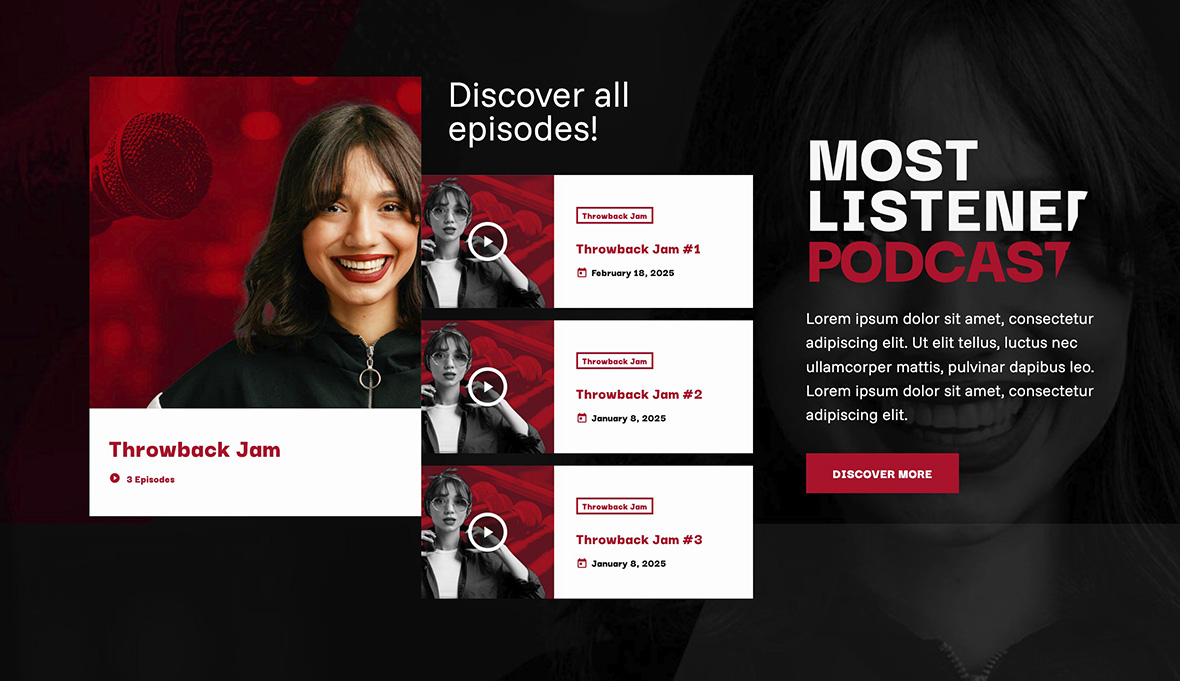
Pro Radio is built with podcasting in mind. It includes dedicated podcast post types and structured archive logic, so you are not forcing blog posts to behave like episodes.
You get:
- Podcast Series archive pages
- Podcast Episodes archives and grids
- Dedicated taxonomy for podcast filters
This means your content is technically organized from the start. Series, episodes, and filters are native elements, not hacks. You can build structured layouts with Elementor, control grids, add filters, and maintain a clean hierarchy.
The result is scalability. Whether you have 10 episodes or 1,000, your structure remains solid.
Best practice: connect podcasts to radio shows

Your archive becomes powerful when it is connected to your live content.
If podcast episodes are linked to the related radio show, you create a content loop:
- Schedule → show page → podcast archive → episode → back to show
This loop increases engagement naturally.
For example, a listener checks today’s schedule. They click on the “Evening Mix” show page. They discover past replays. They listen to an episode from last week. From there, they explore the full archive.
Instead of one page view, you now have four or five. Instead of a quick visit, you have real engagement.
This is how returning visitors are built.
Fast setup path
You do not need weeks to create a professional archive. The process can be structured and efficient:
- Create your podcast series
- Import episodes via RSS if you publish externally
- Build a series grid and an episode grid with filters
- Add the archive blocks to a dedicated Podcasts page
If you already publish on Spotify or another podcast platform, RSS import saves time and keeps everything synchronized automatically. Your website updates when you publish. No manual uploads. No duplication of effort.
Start simple. Then refine your layout and filters as your library grows.
Documentation references
Related guides
- How to Start a Radio Station (Online + FM) Step-by-Step
- Import Podcast RSS Into WordPress (Clean Import)
- Add a Radio Schedule to Your Website (Best Practice)
- Radio Show Pages (Structure + Content That Works)
- WordPress Radio Schedule Plugin (How to Choose)
FAQ
Do I need filters if I only have a few episodes?
Not immediately. If you have 5–10 episodes, a clean and well-designed series grid is enough. Add filters when your library starts growing and navigation becomes less intuitive.
Should I import podcasts via RSS or upload MP3 to WordPress?
RSS import is usually the better long-term solution. It keeps audio hosting on your podcast platform, reduces server load, and updates your website automatically when you publish new episodes.
Can I build custom archive layouts with Elementor?
Yes. Pro Radio provides dedicated podcast grids and archive tools designed to work seamlessly with Elementor, allowing you to create structured, modern archive pages without custom development.
Copyright 2019-2026 ProRadio® Qantum Themes SL® All Rights Reserved