




Turn Up the Fireworks! Pro Radio 8.3 Ends the Year With EXPLOSIVE Updates for Your Radio
Contents
hide
- 1. Radio player: smarter resume option for unstable connections
- 2. Radio player: Citrus3 compatibility out of the box
- 3. New Elementor Sidekick Songs Carousel widget
- 4. Sidekick now supports 100% manual song upload
- 5. Radio player performance: autoplay for administrators removed
- 6. Performance boost: chart vote timeout guardian improved
- 7. Performance boost: Sidekick playlist auto-refresh optimized
- 8. Ready to upgrade?
- 9. Upgrade to Plus and enjoy more features and 500 new templates
- 10. Need help?
- 11. A year of growth, a year of satisfactions
- 12. The Elf Who Quit Being Naughty and Became a Radio Host – Enjoy 15% OFF This Christmas!
Another year is coming to an end and, while many radios are getting ready for their Christmas specials and holiday shows, we are wrapping up the year with one more big update for Pro Radio.
This release focuses on three key areas: a smarter and more reliable radio player for your WordPress website, powerful new Sidekick tools for your music archive, and several performance optimizations to keep your servers fast and stable even during your busiest holiday campaigns.
Radio player: smarter resume option for unstable connections
Is your radio stream occasionally dropping for some listeners? It can happen for many reasons: unstable internet connections, Wi-Fi hiccups, or even temporary issues on the streaming provider side.
Modern browsers have also changed the rules of the game: they now decide autonomously how much audio to buffer, so it’s no longer possible to “force” extra caching to hide network problems.
We still wanted to offer something concrete to help both radios with lower-grade streaming and listeners with poor connectivity.
That’s why the new Pro Radio music player introduces a flexible auto-resume option for radio channels.
What does it do in practice?
It’s a new detection and recovery system that monitors your radio stream and, when a connection lag or interruption is detected, it automatically attempts to reconnect several times, waiting for an optimal interval between each attempt.
By default, if your listeners have a bad connection, the player will automatically try to reconnect up to 5 times, every 7 seconds.
If all attempts fail, instead of silently skipping to another channel or leaving the player “dead”, the system will display a clear message inviting the user to click play again when their connection is back.
No confusion, no “mysteriously silent” players during your Christmas shows.
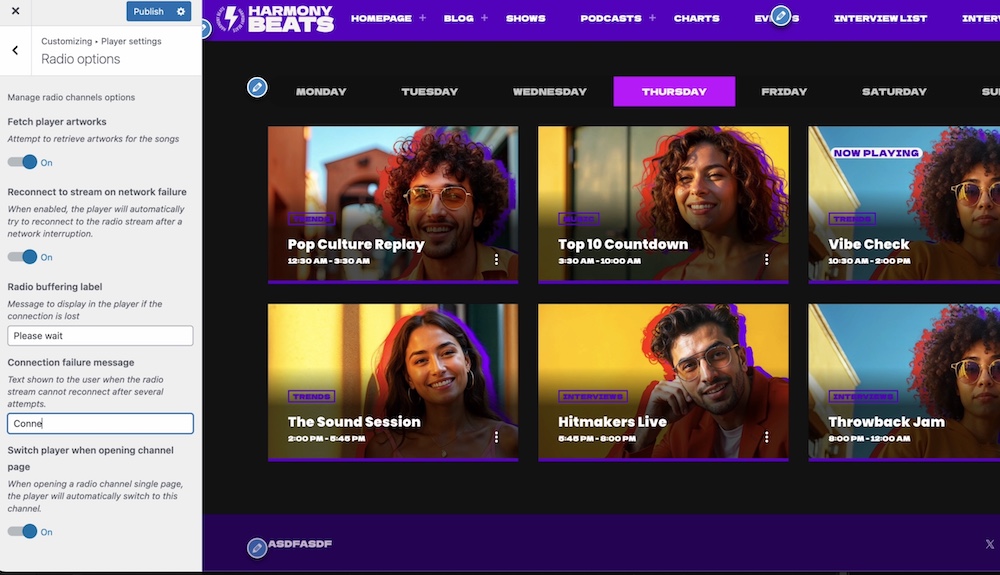
You can enable this feature from:
Appearance > Customize > Player Settings > Radio Options
From the same panel you can also set a fully customizable message for your users, in your own language and tone of voice.
Perfect if you want to add a friendly or even slightly festive touch during the holidays.
Important info:
The resume function comes in place when the browser connection to the original source is interrupted. That’s detected as an end in the stream, and it will try to reconnect.
Want to make a test? After updating to the 8.3 version of theme and player, turn off your wifi, wait for the music to stop, then turn it on again. The player will automatically attempt to reconnect.
Radio player: Citrus3 compatibility out of the box
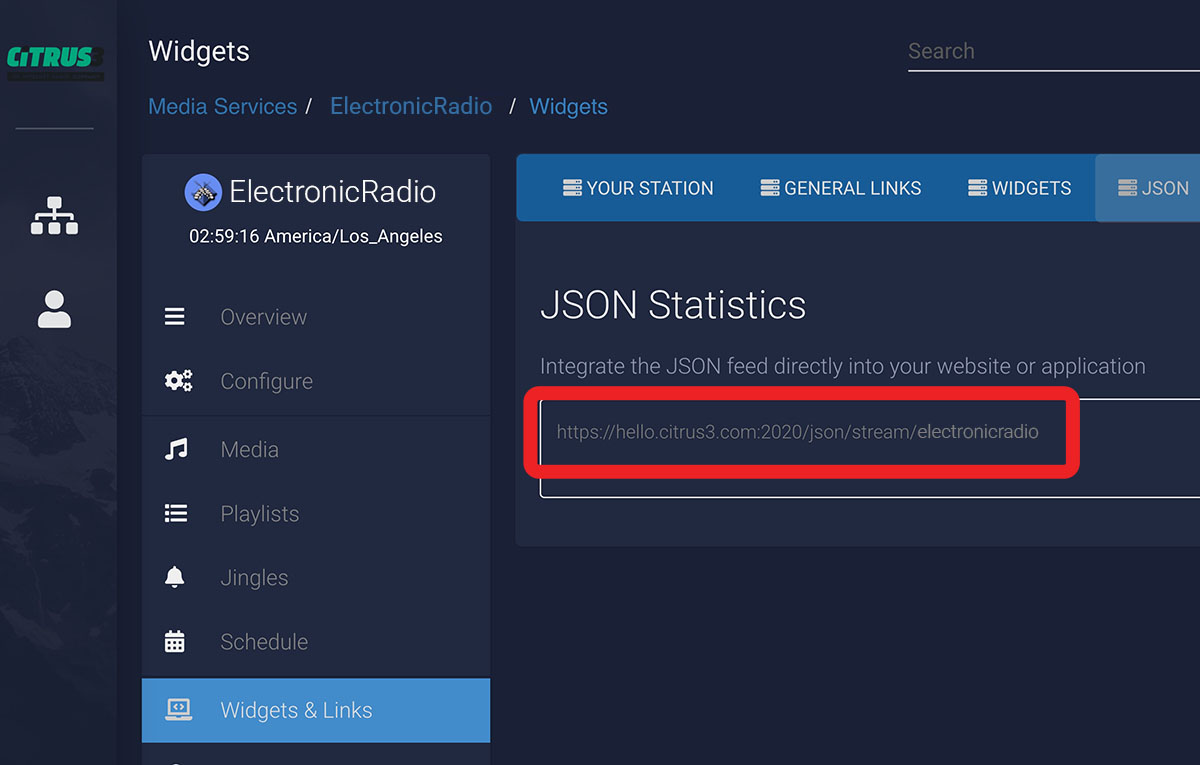
The popular streaming provider Citrus3 is now fully supported by the Pro Radio player for WordPress.
In your radio channel settings you can simply choose “Citrus3” as the stream type and paste your info link. The player will automatically handle the stream and metadata, without custom hacks or extra code.
Not sure how to configure it? Our documentation offers a clear, illustrated guide in 7 languages: learn how to set Citrus3 stream in your WordPress website.
This is especially useful if you’re planning to upgrade your streaming infrastructure for the new year.
New Elementor Sidekick Songs Carousel widget
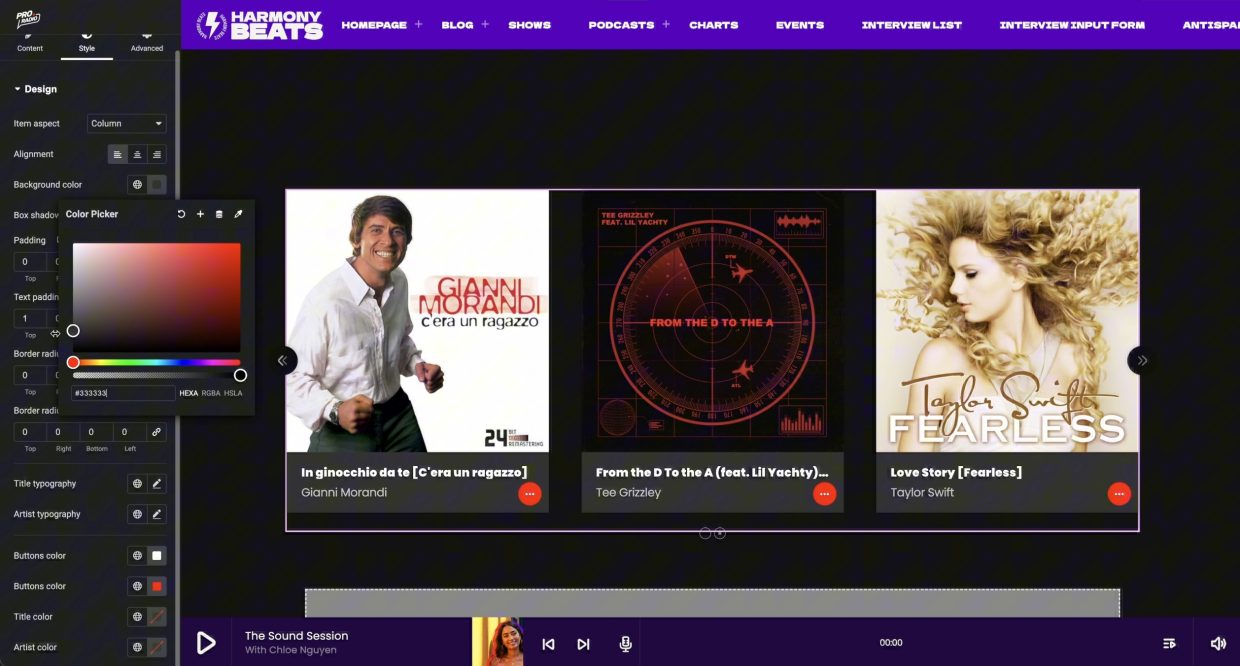
This one has been requested by dozens of users and required a serious amount of development work, but it’s finally here.
Introducing the new Sidekick Songs Carousel: a super-customizable, fast and highly interactive carousel of songs built directly for Elementor.
Use it to display:
- Most recent songs played on air
- Top-liked tracks by your community
- Most played songs of the year (perfect for year-end charts)
- Special Christmas selections, themed playlists and more
All of this is managed visually in Elementor, with multiple layout and styling controls. The carousel integrates seamlessly with your Sidekick Songs archive, including the new manual songs feature (see below), so one single archive can feed charts, playlists, tracklists and front-end carousels.
This widget is designed to boost engagement, keep listeners exploring your content, and increase curiosity about what your station is playing right now and what it played earlier in the day.
Sidekick now supports 100% manual song upload
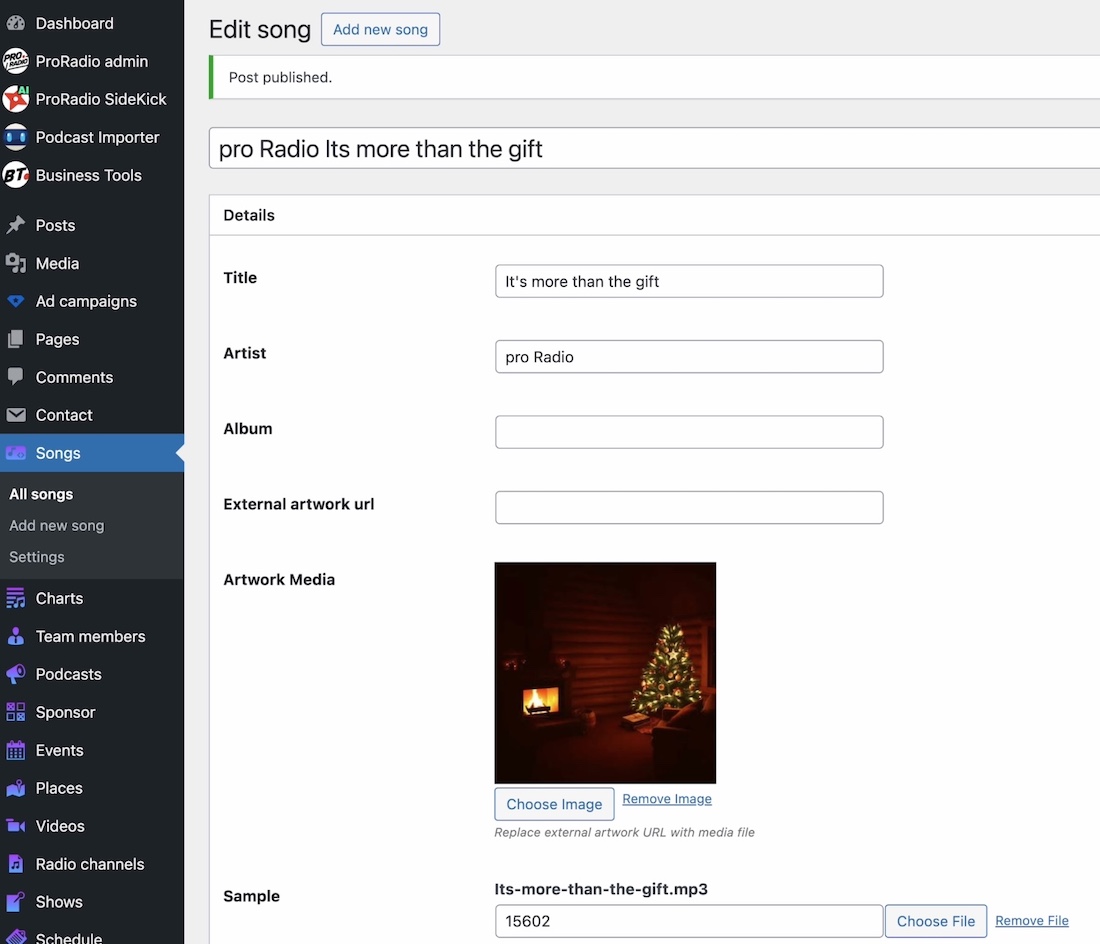
Until now, the Sidekick Songs post type made it easy to search and add songs directly from iTunes. Great for mainstream tracks, but what about local content and independent artists?
We wanted to support:
- Local authors and bands
- Resident DJs and producers
- Bootlegs, remixes and special edits
- Any song that isn’t available on iTunes or major catalogs
From this update, you can create songs completely manually from scratch and store them in your own local, curated database. These songs are first-class citizens: they can be used in charts, playlists, tracklists, the new Songs Carousel and more.
As an example, we used this exact system to build our free Christmas music archive, where every track is catalogued and usable across the Pro Radio ecosystem.
How to add songs manually?
- On the left menu click Songs > Add New
- Set the song title and artist
- Set the artwork
- Optionally add an MP3 sample
- Publish!
In a few minutes, you can build your own catalog of local or Christmas-themed content, fully integrated with Pro Radio widgets and templates.
Use the new songs to generate new charts in a click and new contents with Sidekick AI writer.
Radio player performance: autoplay for administrators removed
To prevent server overload and performance issues, we removed the autoplay feature for administrators.
Originally, autoplay for logged-in admins was meant as a convenient tool for testing. In real-world usage, many users kept this option enabled while opening multiple Elementor tabs and then simply muting the browser.
The result: multiple players trying to autoplay in the background, generating unnecessary CPU spikes and risking to slow down or even stall a server.
Once we fully framed the issue, the conclusion was clear: this behavior was doing more harm than good.
By disabling autoplay for administrators, we significantly reduce background load during development sessions, keeping the server stable and aligned with our primary directive: protecting performance and reliability for all Pro Radio customers.
Performance boost: chart vote timeout guardian improved
Interactive elements are powerful, but they also attract bots, crawlers and automated agents.
Our voting system already included a safeguard timeout to limit excessive database calls coming from malicious spiders, AI, crawlers and similar traffic. However, the massive growth of automated tools in the last year required an extra layer of protection.
In this update, the chart vote timeout guardian has been refined and slightly raised to:
- Further reduce fake or repeated interactions from non-human traffic
- Lower the number of unnecessary database calls
- Improve stability and CPU usage during traffic peaks
For your listeners, nothing changes: the experience remains smooth and immediate. For your server, especially if you’re running Christmas campaigns or year-end polls, this means more safety and fewer risks of resource abuse.
Performance boost: Sidekick playlist auto-refresh optimized
Many Pro Radio websites are now handling very high traffic volumes and complex layouts. To support this growth, we’ve also optimized how often Sidekick playlists refresh.
The Sidekick song widgets include a self-reload feature, previously hard-coded with a 2-minute interval. With this update, the default interval has been increased to 4 minutes.
That means:
- Fewer automatic database calls
- Lower CPU usage on busy sites
- Smoother performance under heavy traffic (for example during holiday events or special live shows)
Your playlists remain fresh and relevant, but your server breathes easier — especially important when your listeners are tuning in from home during the holidays.
Ready to upgrade?
The latest Pro Radio 8.x update is now available for all users with active Updates and Support.
If your coverage expired, you can reactivate it here or take advantage of the Pro Radio Plus launch offer before it ends.
Upgrade to Plus and enjoy more features and 500 new templates
With Pro Radio Plus we wanted to open the door to many smaller and mid-size radios that needed advanced tools but had limited budgets.
Upgrade or switch to Pro Radio Plus and you’ll get:
- Access to Sidekick Premium features
- Business Tools for campaigns, sponsorships and promotions
- The Podcast Importer for automated podcast integration
- Over 500 extra Elementor templates to build pages in minutes
Many of the improvements in this article – from the new player engine to the Sidekick enhancements – shine even more when combined with the full Plus ecosystem.
It’s like putting a bigger, brighter Christmas tree in the middle of your station’s digital home and having all the ornaments ready to use.
Need help?
If you need a hand, our support team has you covered:
- Visit our support desk: Pro Radio Helpdesk
- Explore our knowledge base: Pro Radio Knowledgebase
A year of growth, a year of satisfactions
This has been a long, intense year in which our work on Pro Radio went far beyond expectations.
We launched Pro Radio Plus, released over 500 new templates, added new demos, new plugins, and an impressive amount of refinements, performance tweaks and new features.
This year we also published lots of new features like
- Podybot Podcast Importer Plugin
- Pro Radio Simple Chat plugin
- Charts autoplay
- Pro Radio Sidekick AI
- Added a full podcasting suite of features: new podcast archives, grids, templates and filters,
- Rolled out new streaming compatibility for a lot of platforms – from RadioCult, SteamGuys and EverestCast to StationPlaylist, Radiolize, Broadcast.Radio and RadioBoss and finally Citrus3 today– so Sidekick and the player can follow your station wherever you host your stream
In the same period, we watched many new radio projects grow, and saw hobby stations evolve into established realities.
We welcomed important national-level stations among our users, and we spoke with hundreds of talented radio managers and producers. Their feedback was turned into concrete improvements for Pro Radio, for the benefit of every single customer.
So, thank you:
- To all the radios that have been renewing their update service since 2019
- To all the customers who extend their projects day by day with our new plugins and widgets
- To everyone who took the time to send feedback, suggestions and even criticisms
Seeing that what we build is genuinely useful for your work is the best reward we could wish for at the end of the year.
The biggest news of the year was undoubtedly Pro Radio Plus.
For those wondering why we introduced a SaaS license model alongside the classic license, the answer is simple: Pro Radio comes with many additional add-ons, and sometimes smaller radios wanted to use them but the total one-time cost was too high. With Pro Radio Plus we wanted to give those radios full access to Sidekick Premium, Business Tools, the Podcast Importer, Dedications Premium and an extensive library of new templates that required hundreds of hours of our designer’s relentless work.
The result is an offer that can adapt to very different needs and budgets, so we can finally reach stations we couldn’t properly serve before.
It has also been a real joy to welcome back many former customers who tried Pro Radio years ago, experimented with other options, and then decided to return to our theme. This is one of the strongest confirmations that we are on the right path – and your feedback has played a crucial role in that journey.
This is our last update of the year, and we hope it will help your radio grow even more, both technically and creatively.
But stay tuned: we already have stunning news in the works for next year.
Subscribe to our newsletter to get:
- Exclusive access to new content
- Early previews of new templates
- Special discounts and promotions
- News about upcoming features and tools
Thank you once again and have a wonderful holiday season – whether you’re surrounded by friends and family, or enjoying some quiet time on your own by choice.
In the end it’s always the same magic: you, your radio, your listeners.
See you on air – and in your WordPress dashboard – next year!
The Elf Who Quit Being Naughty and Became a Radio Host – Enjoy 15% OFF This Christmas!

After years of chaos in the North Pole studios, one little elf finally turned things around and followed his dream — building his own web-based radio station using Pro Radio, the premium radio WordPress theme and radio website builder for broadcasters, webradio stations, DJs, podcasters, and more.
To celebrate his fresh start, we’re offering 15% OFF Pro Radio and Pro Radio Plus from December 11–18. Just use the code ELF at checkout to save on:
️ Pro Radio WP — the full featured radio website template to launch your station on your own hosting.
Pro Radio Plus — includes 350+ prebuilt templates and extra tools for your internet radio site. With Pro Radio, you can quickly set up a modern radio station website that streams live audio, highlights shows and schedules, supports podcasting, and brings your brand to life online.
Whether you’re starting a new station or refreshing your online presence, now’s the perfect time to build with the best.
Don’t miss this festive offer — grab your discount and launch your radio website today!

You may also like







Copyright 2019-2026 ProRadio® Qantum Themes SL® All Rights Reserved