Background
trending_flat

Pro Radio Theme Update

A new theme update was released for Pro Radio and several bundled plugins. The new update provides quite a few new options, settings and possibilities. In this brief post we will present the innovations and advantages of updating. Theme updates: The main theme has a few improvements about options and a new podcasting feature. Now the "Streaming app icons" buttons for Elementor are correctly setting a different background, even if a gradient is set in the customizer. This means that now you are allowed to override the global styling from the customizer for the app icons setting any custom one. https://shop.pro.radio/knowledgebase/34/4.5-Streaming-app-icons.html Podcast cards have been improved: if setting chapter cues for podcasts, now the cards will include an Expansion 3 dots button, that will display the cues and chapters for the podcast. This will allow a listener to skip to […]

trending_flat

Pro Radio theme for WordPress – Update 1.7.0

Good morning everybody! Another bright day is shining on your radio station website! And it's bringing blazing new features, streaming compatibility and improvements! The new Pro Radio template version 1.7.0 is out! And includes also 2 plugin updates: Pro.Radio Player and Pro.Radio Widgets for Elementor. Anyway,  before proceding any further, if you still wonder what Pro Radio is, let me introduce it: Pro Radio is a theme for WordPress crafted for radio stations, and fitx perfectly both professional and hobby radios. Packed with anything you need, it comes with 20+ templates to start your website in a few click. If you have a radio station website and need a better template, check it out! Subscibing to our newsletter, you will also get an instant coupo code! Pro Radio Widgets for Elementor: added image size option   We added a dropdown […]

trending_flat

Pro Radio theme for WordPress – Update 1.6.8

Hello everybody! Today we released a new update for the Pro Radio theme for WordPress, with some great improvements, bug fixes, and new features. 1.6.8 [2021-04-29] [x] PLUGIN UPDATE: Proradio Swipebox [x] PLUGIN UPDATE: Proradio Player PR.3.6.4 - added laut.fm support, radiojar improved [X] UPDATED PLUGIN Pro Radio Elementor to PR.2.2.1 [x] Sponsors carousel widget added filter by ID [x] UPDATE WOOCOMMERCE TEMPLATE proradio/woocommerce/checkout/form-pay.php [x] ADDED Radio channel "laut.fm" server type - API Below here's the list of updates in detail:   Pro Radio Swipebox Plugin Update A small update was needed to get onboard the new Swipebo fix, that is required for WordPress 5.7.1. The previous version stopped the carousel swiping functionality, because WP 5.7 comes with jQuery 3 and it became obsolete. Updating this plugin you'll have the cool gallery slider back and working smoothly. Click to see […]

trending_flat

Custom radio player builder for Elementor

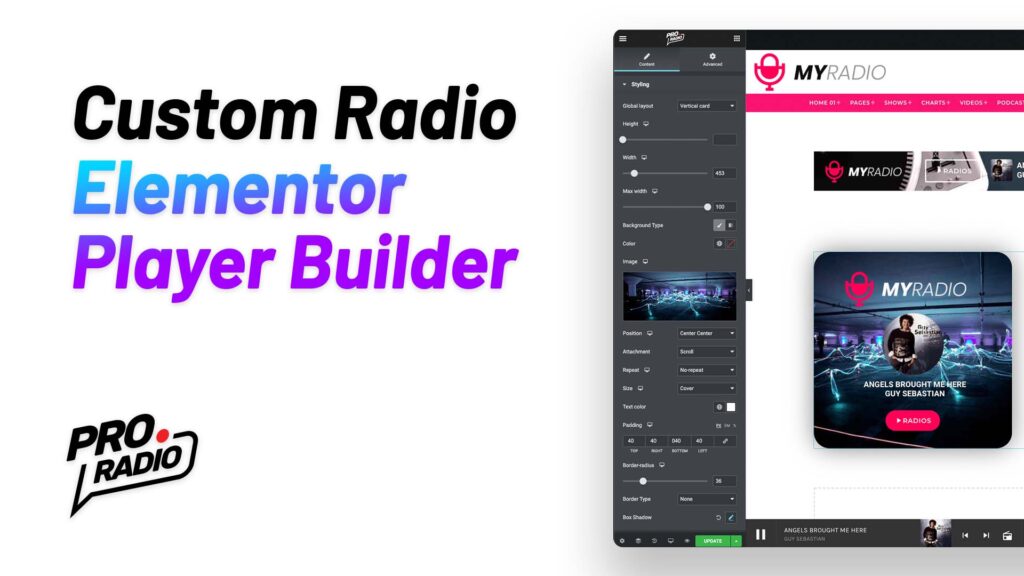
Pro Radio WordPress theme presents an upcoming feature for this Christmas that will make super happy every radio station owner! Free of charge, completely included in the standard Pro Radio WordPress Theme, there is a new feature coming with the Christmas update adding unprecedented flexibility to the radio station player design for your website. The new version of the Pro Radio Elementor Widgets plugin in fact will contain a new widget called Custom Player, containing more than 130 custom options to build from scratch any type of radio station player, with inline or fixed positioning, also available for usage in the Popup from the menu bar. Example of a custom player built with Elementor and Pro Radio: What is the new Custom Radio Player Builder? The new Custom Player Builder is a widget, included in the Pro Radio Elementor plugin […]

trending_flat

OnAir Radio WordPress Theme version 1.3.4 is available now

We just published a new version with a javascript debug glitch published yesterday, and in this post you can check also all the new features recently added to OnAir Radio Wordpress Theme:   1.3.4 [2016 12 07] * qt-main.js debugger bug fixed 1.3.3[2016 12 06] * fixed recent schedule tabs issue * fixed new javascript Safari incompatibility in IF conditions ###### QantumThemes Radio Suite updated: ######################## # ###### Version: 1.1.2 ###### * assets/script.js restored $("[data-dynamicwidth]") # ###### Version: 1.1.1 ###### * style.css fixed columns width schedule grid # ######################## ######################## ############### 1.3.2[2016 12 02] * fixed new mobile menu issue 1.3.1 * fixed sidebars mismatch 1.3.0 * fixed issue with multiple schedule shortcode [showgrid schedulefilter="angelstream"] requires QT Radio Suite update to 1.1.0 1.2.9 * added better woocommerce support (woocommerce.php and templates in /woocommerce + few js fixes) * added class […]

trending_flat

OnAir 1.2.6 is out!! iOs 10 compatible, more social, and Microsoft-Edge ready!

Dear customers, we are finally out with the new version of the OnAir theme. In the latest period we had to face 2 big revolutions: iOs 10 for ipads and iphones, and the new Microsoft Edge giving us some nice challenge to win. And we are here to say that we did it! You can download the new version of your OnAir Radio Station Wordpress Theme and update as usual to get all the afvantages of the new version! 1.2.6 * Updated soundmanager2 libraries for ios10 * fixed styles for radio list in mobile * fixed logo alignment in mobile (left aligned) * added "scheduled on" section in single show page (ADDED part-showdate-by-title.php and edited single-shows.php:86->99) * added sharing button to single.php * added large share buttons template (sharepage-large.php) * added large share formatting in main-style.css:602-611 * added better mobile […]

trending_flat

ONAIR 1.2.0 is out!

1.2.0 * Blockquote custom color added in customizations.php * default page template hide title enabled * youtube responsiveness updated 1.1.9 * updated .po .mo * added .pot file * updated plugin WT Radio Suite (added better support for translation) * updated part-post.php, part-post-third.php and part-post-featured.php where the word Read was not translatable How to update: You can update the theme downloading the latest version linked from your purchase confirmation email, from the radiowordpresstheme.com website or from the official Dropbox repository link. If you have problems accessing your updated theme version, please get in touch with the support via email at info @ qantumthemes.com . To update, please follow the instructions contained in the manual.

trending_flat

OnAir Version 1.1.8:

We are proud to introduce the new version of OnAir: 1.1.8. After a long month of work on our customers' best requests, we decided to add a couple of features, and to optimise some aspects of the theme. Podcasts support Now you will find a new post type, called Podcasts, which allows you to create a new type of contents. Podcasts are essentially pages with a media content inside, a featured image, and a content. The new podcast type supports podcast from Mixcloud, Soundcloud and Youtube, and you can also link directly to the MP3 file of your self hosted podcast. Simply adding the URL of your resource, the player will be automatically embedded in the page. Podcast archives: Podcasts have their own archive templates, and you can easily create a podcast archive page by creating a new page and choosing the "Podcast […]

trending_flat

ON AIR Radio WordPress Theme 1.1.6 is finally out!

We just release the new version of OnAir 1.1.6 You can now: Add fantastic "top 10" widgetswith latest charted tracks or specific charts, choosing number of charts and customizing the layout. Add a popup player to your website in few clicks and completely customize your popup player window with contents and widgets, or link to your own html page. Create category blog pages Add unlimited radio channels with channel switcher with the Featured player   ON AIR RADIO WORDPRESS THEME THEME CHANGELOG: 1.1.6 (2016 01 21 - 2016 01 24) MAJOR UPDATE: MANY FUNCTIONS ADDED IMPORTANT: * Updated QT Radio Suite plugin * Updated QT Banner plugin FEATURED PLAYER: * added Radio Channels post type * added unlimited radios playlist capability to Featured Player * Added volume background svg * added tooltips and animations to featured player * added animated […]

free bonus

Subscribe to our newsletter!

The best thing you can do today for your radio station! Free tutorials, template downloads and discounts.

Login to enjoy full advantages

Please login or subscribe to continue.


Go Premium!

Enjoy the full advantage of the premium access.

Stop following

Unfollow Cancel

Cancel subscription

Are you sure you want to cancel your subscription? You will lose your Premium access and stored playlists.

Go back Confirm cancellation